
How to Remove Specific Objects from Real Estate Photos with AI

Stageless Team
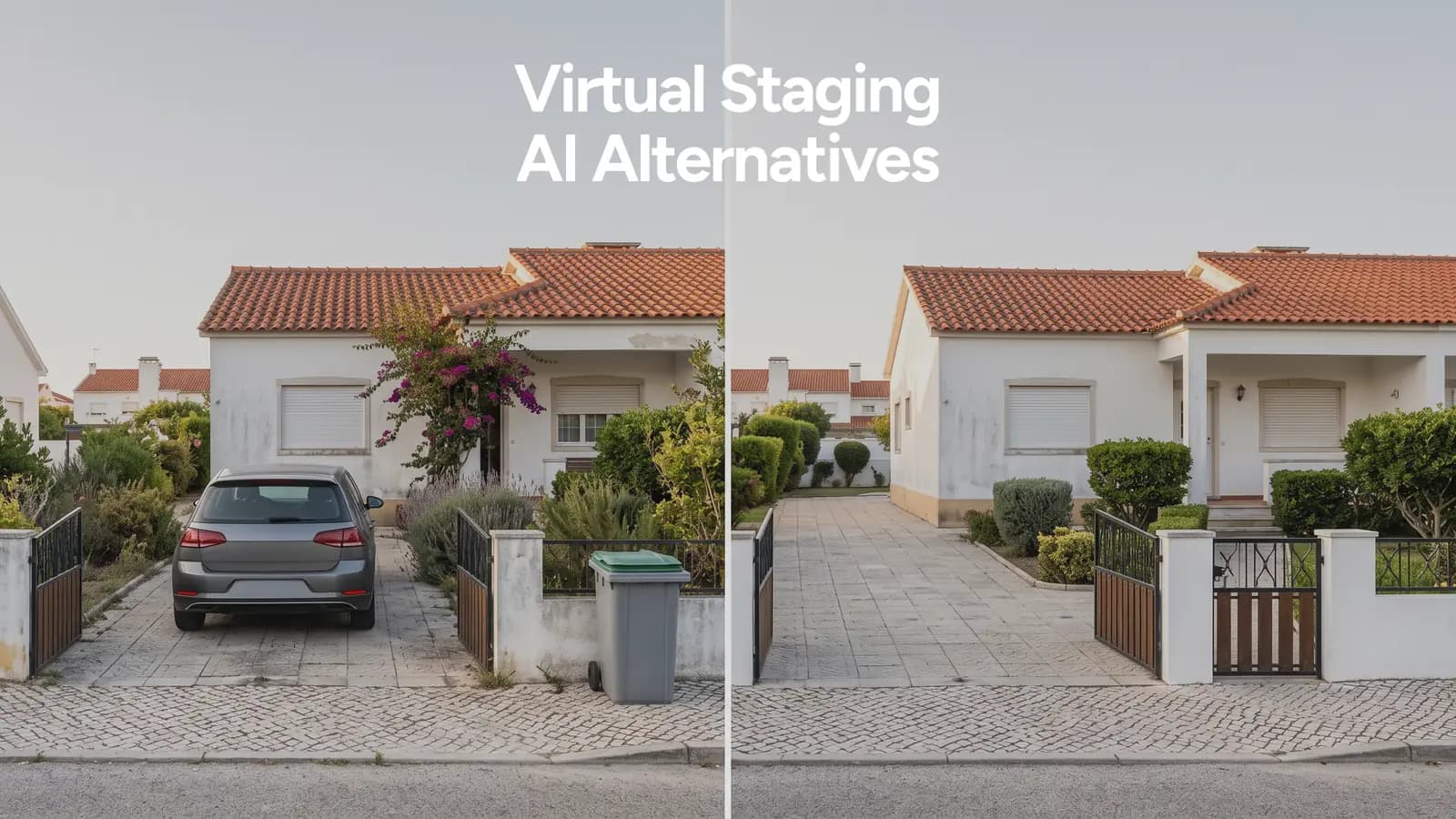
A listing photo can be right in every way except one thing: a car parked across the driveway, a bin left out for collection, a neighbour’s fence bleeding into the frame. None of that is staging. It is a single object that does not belong in the shot, and it needs to disappear without touching anything else in the photo.
That is a different job from decluttering a room. Emptying a furnished space so it can be staged from scratch is one task. Taking a single object out of a photo that is otherwise ready to publish is another. Stageless AI treats these as two separate tools, Object Removal and Declutter, because agents reach for them at different points in the editing process, not the same one.
Removing One Object vs Emptying a Room
Decluttering starts from a furnished room and ends with an empty one, ready for virtual staging. It is a full reset: every piece of furniture, every rug, every lamp goes, because the room is being rebuilt from nothing.
Object removal starts from a photo that already works and takes out the one thing that spoils it. The room stays exactly as photographed. Only the car, the bin, or the loose cable disappears. If your problem is a furnished room you need to empty before staging, use the declutter tool. If your problem is one object in an otherwise good photo, this is the one you want.
The 7 Objects That Show Up Most in Real Estate Photos
Cars parked in the driveway or street
The most common request, and the trickiest for a manual edit, because a car usually covers part of the garage door, the path or the lawn behind it. The AI has to reconstruct paving, brickwork or grass under where the car sat, not just paint over it. Shoot the exterior at a time when the street is clear if you can, but when you cannot, this is the fix.
Bins and recycling containers
Collection day and viewing day overlap more often than anyone plans for. Bins are small but they sit on the ground plane, which means the software has to rebuild a strip of pavement or driveway underneath, the same challenge as a parked car on a smaller scale.
Toys and personal items on the floor
Children’s toys, shoes by the door, a pet bed in the corner. These read as clutter rather than as staging problems, but they are still specific objects on an otherwise fine floor, and removing them one by one is faster than restyling the whole room.
Family photos and personal decor
Buyers need to picture themselves in the home, not the current owner’s family. Photos on the fridge, on shelves, on the stairs wall, are worth removing even from a photo that needs no other edit. This is one of the few object types where the fix is also a legal courtesy: personal images of people who have not consented to appear in a public listing.
Visible cables and wires
TV cables, charger cords, extension leads trailing across the skirting board. They are thin, they are usually against a plain wall or floor, and they are one of the easiest edits for the AI to get right, because the surface behind them is simple to rebuild.
Outdoor air conditioning units
A wall-mounted condenser unit on the façade is real, permanent and part of the property, so it is not something you would remove from a renovation photo. But on an exterior shot where it interrupts an otherwise clean wall or breaks the symmetry of a listing photo, agents often prefer it gone. Use this one with judgement: removing a fixture that will still be there at the viewing sets an expectation the property will not meet.
Bikes, sports equipment and prams
Left in a hallway, propped against a wall, or filling a garage that is meant to read as storage space. Same logic as toys: a specific object on an otherwise usable shot, gone in one pass instead of a full room reset.
How to Do It, Step by Step
Upload the photo. Works from a raw shot straight off the camera or phone, no pre-editing needed.
Mark the object. Circle it, brush over it, or let the tool auto-detect common objects like cars and bins.
Let the AI reconstruct the area behind it. The software rebuilds the surface, texture and light that would be there if the object had never been in frame.
Check the edges. Zoom into where the object used to be. Reconstructed surfaces are usually seamless, but this is the one step worth doing by eye before you export.
Export and move to the next photo. Batch the same fix across a full shoot instead of repeating it one image at a time.
The Mistakes That Ruin the Result
Removing too much in one pass. Circling a wide area instead of the object itself gives the AI more to reconstruct than it needs to, which raises the chance of an artefact. Mark the object closely.
Ignoring reflections and mirrors. A car removed from the driveway but still visible, faintly, in a window reflection undoes the edit. Check glass and mirrored surfaces in the frame before you call it done.
Inconsistent light between the fixed area and the rest of the photo. This shows up most on outdoor shots, where the reconstructed patch of driveway or lawn needs to match the exact light of the original, not a generic version of it.
Editing the wrong photo in the set. With object removal running fast enough to batch a whole shoot, it is easy to fix the same object in every photo except the one where a second, different object also needs attention. Check the full set at the end, not just the one you were working on.
Treating a permanent fixture like a removable object. An air conditioning unit, a satellite dish, a doorbell camera: these exist after the sale too. Removing them changes what the buyer expects to find, not just what they see in the photo.
AI Object Removal vs Manual Photoshop: When Each One Pays Off
For a single object on a plain background, AI object removal wins on every measure that matters to an agent: it is close to instant, it costs a fraction of an image, and it batches across a full shoot instead of one photo at a time. Stageless AI runs pay-as-you-go from €0.60 per image, or as part of the Base plan (€10.99/month, 20 credits) and Pro plan (€44.99/month, 100 credits), with 20 free credits on signup and no card required to try it.
Manual editing still earns its place on the hard cases: an object that overlaps a complex reflection, a removal that has to preserve a shadow cast by something else in the frame, or a photo where three or four unrelated fixes are needed at once and a human editor can judge the whole image rather than one object in isolation. For the seven objects in this guide, that is the exception, not the rule.
Written by Stageless Team
We are a team of real estate technology experts passionate about AI. Our mission is to help agents sell faster by democratizing access to high-end virtual staging tools.