

Virtual Staging AI: How the Technology Works and What Separates the Good Tools From the Ones That Fail in Production

Stageless Team
Editor in Chief
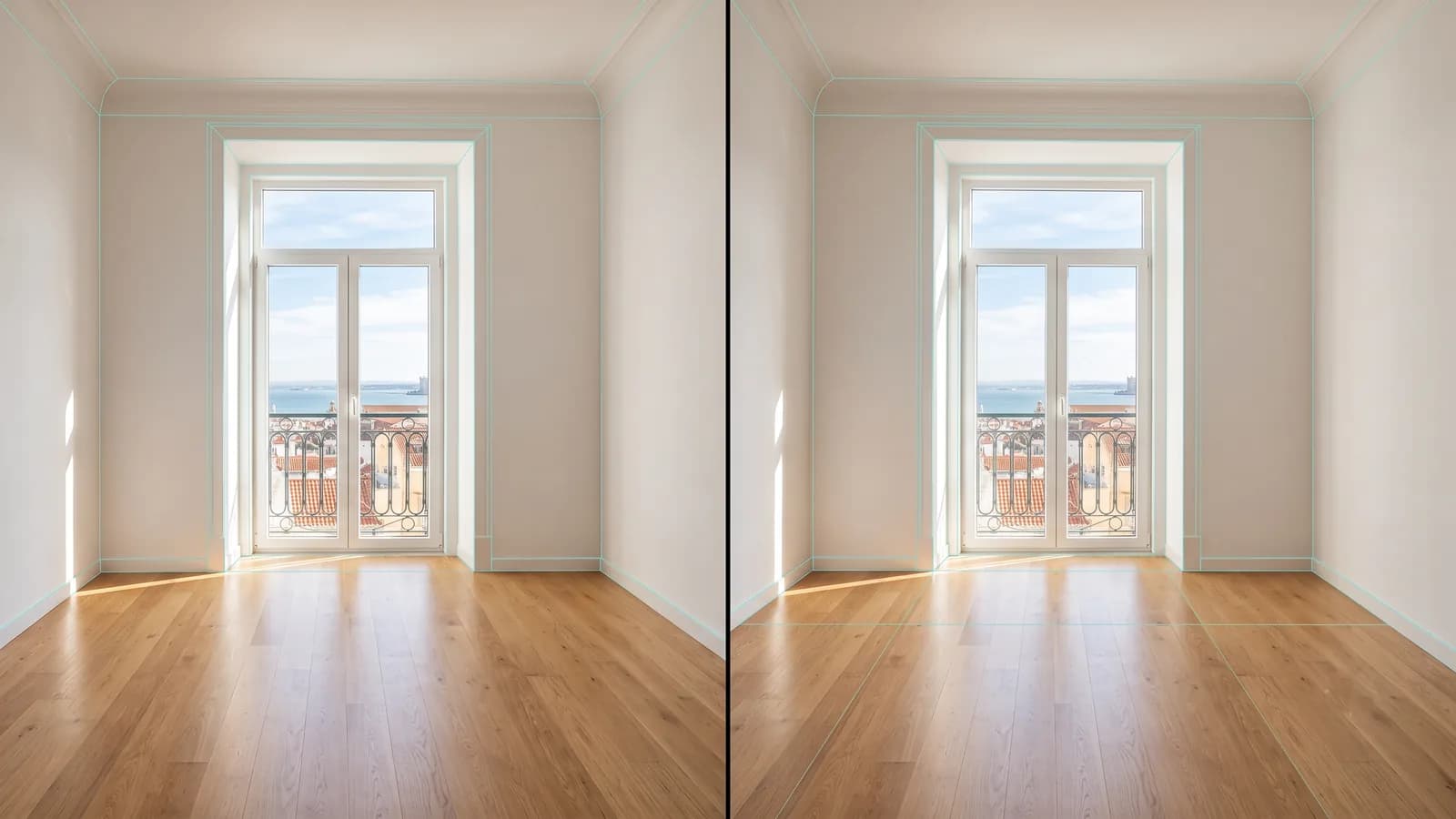
There are more than 30 AI tools currently marketing themselves as virtual staging solutions. Most produce images that look impressive in a demo environment and create problems in production. The reason is not that AI staging is unreliable — it is that most tools are built on general-purpose image generation models that were never trained to understand the specific demands of architectural photography.
This guide explains how virtual staging AI actually works, what the technical differences between platforms mean in practice, and what to evaluate before committing to a tool for professional listing use.
What Virtual Staging AI Is — and What It Isn't
Virtual staging AI is software that uses machine learning to analyse a photograph of a real room and insert photorealistic furniture, décor, and lighting into the image automatically, without human design input.
The AI receives an image, processes it, and returns a furnished version of the same space in under two minutes. The agent selects a style — Modern, Scandinavian, Luxury, and so on — and the AI handles all design decisions: which furniture to place, where to place it, how to render materials and shadows.
What it is not
It is not a rendering tool. Rendering tools build rooms from scratch using 3D modelling software and floor plans. Virtual staging AI works from a photograph of an existing, real space.
It is not a photo editor. Photo editors require human operators to manually place digital objects into photographs. Virtual staging AI generates the entire furnished image automatically from the upload.
It is not a general-purpose AI image generator. Tools like Midjourney or DALL-E generate images from text descriptions and have no understanding of the physical space they are producing. This is the most important distinction for professional listing use.
The Core Technical Problem: Why Most AI Staging Tools Fail
The virtual staging AI market is dominated by tools built on top of general-purpose diffusion models — the same underlying technology that powers popular image generation tools. These models are trained on vast datasets of images and learn to produce visually plausible outputs from text and image prompts.
The problem is that visual plausibility is not the same as architectural accuracy.
What hallucinations look like in virtual staging
In AI development, "hallucination" refers to outputs that are factually or visually incorrect — the model has generated something that looks plausible but is not accurate. In a virtual staging context, hallucinations typically manifest in specific ways:
Windows that appear to have moved between the original photo and the staged version. Walls that are slightly misaligned with the original geometry. Furniture that is slightly too large or too small relative to the room's actual dimensions. Floor surfaces that look different in different parts of the same image. Shadows that fall in a direction inconsistent with the existing light sources.
None of these errors are immediately obvious to most buyers in a thumbnail view. They are noticed at full resolution, during close examination, or during an in-person visit when the room does not match the impression created by the listing photos. By that point, the damage — in terms of buyer trust and credibility — is already done.
The geometry problem
A general-purpose image model does not understand that a photograph is of a real, physical space with fixed, unchangeable dimensions. It has learned what rooms look like by processing millions of interior photographs, and it generates outputs that look like rooms. But it has no mechanism for constraining its output to match the specific geometry of the input photograph.
An AI staging model built specifically for real estate photography is trained to treat the input photograph as a constraint. The window positions, wall angles, floor texture, and room proportions in the output must match the input exactly. Any deviation is an error, not an acceptable creative variation.
The reproducibility problem
For agents staging multiple photos of the same property — a living room from two angles, an open-plan space that connects to the kitchen — consistency matters. A buyer scrolling through a listing should see a coherent interior, not a different furniture arrangement in every photo.
General-purpose image models have no concept of consistency across multiple images. Each generation is independent. Staging-specific tools allow style selection to act as a consistency control, producing furniture and colour palettes that are coherent across multiple images of the same property.
What Architecture-Aware Virtual Staging AI Does Differently
Geometry preservation as a hard constraint
Architecture-aware virtual staging models treat the input photograph's geometry as inviolable. The AI is constrained to place furniture within the physical space defined by the actual room. Walls stay where they are. Windows remain in position. The floor surface in the output is the same floor surface as in the input, with the same texture, the same reflections, the same relationship to the walls.
Stageless AI was built around this principle. The technical team's background in computer vision and 3D geometry is reflected in the platform's core behaviour: when you remove a piece of furniture with the declutter tool, the floor that appears underneath is the actual floor of the room — not an AI-generated reconstruction of what a floor might look like in that space.
Accurate shadow and light integration
Furniture placed in a real room must integrate with the lighting conditions that already exist in the photograph. If a room has natural light coming from the left, the shadows on all furniture must be consistent with that light direction. The intensity of the shadows must match the intensity of the light. The colour temperature of the shadows must be consistent with the colour temperature of the source.
This is a computationally demanding constraint that general-purpose models ignore. When you look at a virtually staged image and something feels slightly artificial without being obviously wrong, it is almost always the lighting. The furniture looks real, but the shadows are slightly inconsistent with the rest of the image, and the brain registers the mismatch.
Material rendering at full resolution
In 2026, portal listings are frequently displayed at high resolution on large screens. An image that passes inspection at web thumbnail size needs to hold up when expanded. This places demands on material rendering — the grain of a linen sofa, the sheen of a lacquered coffee table, the texture of a wool rug — that general-purpose models do not consistently meet.
4K output with accurate material rendering is now the minimum standard for professional listing use. Images generated at lower resolution or with flat, plastic-looking material rendering read as artificial at the sizes buyers actually examine them.
The Edit with Instructions Feature — Why It Matters
One limitation of early AI staging tools was rigidity. The model generated a staged image, and if the agent or client wanted to change a specific element — the sofa was the wrong colour, the rug was too busy, the lighting felt too cold — the only option was to regenerate the entire image and hope the new version was better.
Stageless AI's Edit with Instructions feature addresses this directly. After receiving a staged image, you describe the change you want in plain language:
"Change the sofa to a dark charcoal grey." "Remove the floor lamp on the right side." "Replace the rug with a lighter, more neutral option." "Make the wall colour slightly warmer."
The AI applies exactly the change described. The rest of the image — the geometry, the other furniture, the lighting — remains untouched. Only the requested element changes.
This makes the staging workflow significantly more efficient. Instead of multiple regeneration cycles to arrive at a final image, the agent generates a base staging and makes targeted refinements. The process is closer to working with a responsive designer than with a vending machine.
AI Staging vs. Human-Edited Virtual Staging — The Current State of the Comparison
For most of the first decade of virtual staging, the argument for human-edited services over AI was simple: quality. Designer-produced staging was more accurate, more consistent, and more believable than early AI alternatives.
That argument has largely dissolved in 2026.
Quality convergence
AI staging quality has converged with designer-produced quality for the majority of residential listing types. Standard rectangular rooms — living rooms, bedrooms, kitchens — are handled reliably by modern AI tools. The outputs are, for practical purposes, indistinguishable from designer-produced work at listing photo resolution.
The remaining advantage of human editing is in edge cases: non-standard room shapes, very complex lighting conditions, or spaces where precise furniture placement requires human judgement. For these situations, a designer-assisted service still adds value. For the 85% of listings that are standard residential spaces, AI produces comparable results in seconds at a fraction of the cost.
The workflow comparison
| Factor | Stageless AI | Designer-edited virtual staging |
|---|---|---|
| Turnaround per image | Under 2 minutes | 1–3 business days |
| Cost per image | From €0.60 | €15 – €50 |
| Style options | Instant switching | New order per style change |
| Revision process | Edit with Instructions | New revision cycle |
| Consistency across rooms | Controlled by style | Variable by designer |
| Exterior staging | Available | Available at additional cost |
| Video tours | Available | Not available |
What to Evaluate Before Choosing a Virtual Staging AI Tool
Test with your own photos, not demo images
Every virtual staging tool looks good on its own demo images, which are selected specifically because they produce excellent outputs. Test any tool you are considering with photos from your actual listings — including photos that are imperfect, taken in mixed lighting, or from slightly awkward angles. The performance on these photos is what determines how useful the tool will be in production.
Check for geometry preservation
Upload a photo with clear architectural features — a doorway, a window with an obvious position, a built-in feature on a specific wall — and verify that these features are in exactly the same position in the staged output. Any movement is a geometry failure that will create trust issues when buyers visit.
Evaluate shadow consistency
Look at the shadows cast by the placed furniture. Are they consistent with the direction of the light source in the original photograph? Are they appropriately soft or hard given the type of light in the room? Inconsistent shadows are a reliable indicator of a model that does not perform lighting physics correctly.
Check material quality at full resolution
Download the staged image and open it at 100% zoom. Examine fabric textures, wood grain, glass surfaces, and rug pile. Do the materials look like materials, or do they look like flat surfaces with texture patterns applied? The quality gap between the best and worst AI tools is most visible at full resolution.
Test the edit capability
If the tool offers instruction-based editing, test it. Request a specific, targeted change and check that only that element changed. If the surrounding image was also affected — different furniture appeared, room proportions shifted, colours changed elsewhere — the editing model is not precise enough for production use.
The Complete Stageless AI Feature Set
For agents evaluating Stageless AI specifically, the full service covers:
Interior virtual staging — furnishing empty rooms in any of the available styles, with geometry-preserving AI and 4K output. From €0.60 per image.
AI decluttering — removing existing furniture and objects from occupied property photos, revealing the actual floor and wall surfaces underneath.
Object removal — targeted removal of specific objects from photographs: cars in a driveway, a bin that appeared in the frame, scaffolding from an adjacent property.
Exterior renovation — digital renovation of property façades, gardens, driveways, and outdoor spaces. Available in the same workflow as interior staging.
Edit with Instructions — plain-language editing of staged images. Change specific elements without regenerating the full image.
AI Video Tours — cinematic walkthrough videos generated from existing photos and a floor plan. No camera crew, no editing, no scheduling.
All services are available from the same browser-based platform, on desktop and mobile, with no software installation required.
Try Stageless AI free at stageless.ai — 3 credits, no subscription, no credit card.
Written by Stageless Team
We are a team of real estate technology experts passionate about AI. Our mission is to help agents sell faster by democratizing access to high-end virtual staging tools.

