Affordable Virtual Staging: How to Stage 20 Listings for Under €100 (2026 Guide)

Stageless Team
Editor in Chief
Affordable Virtual Staging: How to Stage 20 Listings for Under €100 (2026 Guide)
The Staging Price Problem No One Talks About
Every real estate agent knows that staged listings sell faster and for more money. The data is unambiguous: staged homes spend 73% less time on market and consistently command up to 10% above the asking price compared to vacant equivalents.
But here is the problem that rarely gets discussed openly in the industry: the cost of professional physical staging — typically €1,500 to €3,000 per property in European markets — makes it financially impossible to stage every listing on your books. Most agents end up staging only their highest-value properties and accepting lower-quality presentation on everything else.
The result is inconsistent portfolio presentation, lower engagement on mid-range listings, longer average days-on-market, and ultimately, revenue left on the table.
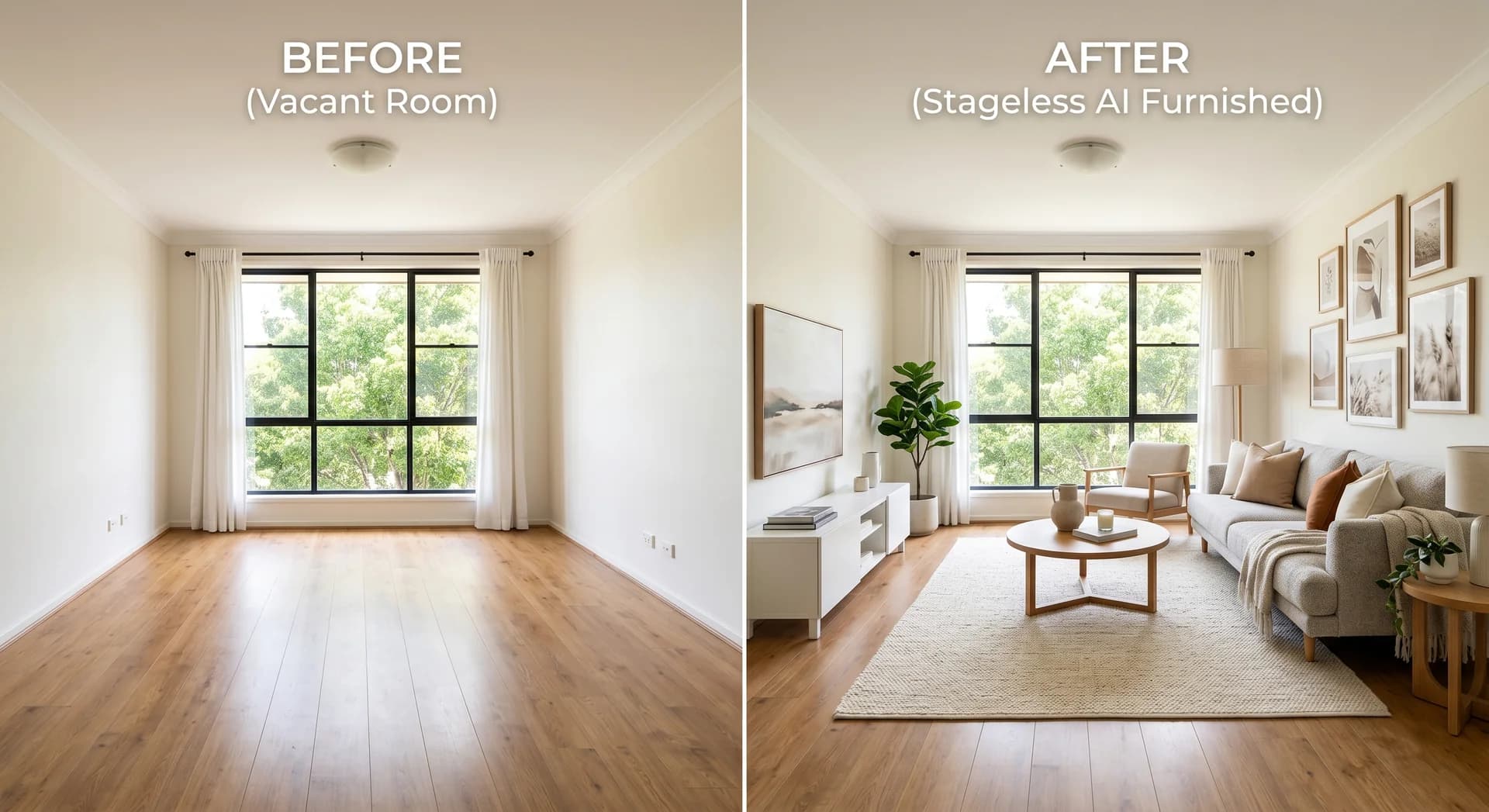
AI virtual staging has changed this equation entirely. With tools like Stageless AI's AI Virtual Staging service, it is now possible to stage a full property — every room, in 4K quality — for under the price of a coffee per photo. This guide shows you exactly how to do it for 20 complete listings for under €100.
The Real Math: What Virtual Staging Actually Costs in 2026
Before comparing options, it is worth establishing exactly what you are paying for. The Stageless AI pay-per-photo rate is €0.60 per image. Monthly professional plans start at €49 for up to 100 photos and €99 for up to 250 photos. There is no minimum commitment — you can stage a single photo without signing up for a subscription.
Here is what that means in real terms for a high-volume agent:
| Scenario | Photos | Cost at €0.60/photo | Physical Staging Cost | Your Saving |
|---|---|---|---|---|
| 1 listing, 10 photos | 10 | €6 | €1,500–€3,000 | €1,494–€2,994 |
| 5 listings, 10 photos | 50 | €30 | €7,500–€15,000 | €7,470–€14,970 |
| 10 listings, 10 photos | 100 | €60 | €15,000–€30,000 | €14,940–€29,940 |
| 20 listings, 8 photos | 160 | €96 | €30,000–€60,000 | €29,904–€59,904 |
| 20 listings, 10 photos | 200 | €120 (or €98 on 2× Pro Plan) | €30,000–€60,000 | €29,880–€59,880 |
💡 Quick Calculation: To stage 20 listings under €100: use 8 photos per listing (160 photos × €0.60 = €96). For 10 photos per listing, two months of the Professional Plan at €49/month covers 200 photos for exactly €98. Both routes come in under €100.
Why €0.60 Per Photo Does Not Mean Lower Quality
The most persistent objection to affordable virtual staging is the assumption that a low price indicates a low-quality output. In 2022, this concern was partially valid. Early AI staging tools produced renders with blurry textures, floating furniture, incorrect shadow angles, and perspective distortions that were immediately obvious to any trained eye.
In 2026, that technological gap has closed decisively. The current generation of AI staging — as delivered by Stageless AI — produces results that are genuinely difficult to distinguish from physical staging photography, even for experienced agents and photographers.
The AI Virtual Staging tool delivers 4K Ultra-HD resolution as standard, with physically accurate light-bounce simulation (shadows and reflections are computed from the room's actual light sources, not pre-set templates), material texture realism across fabric, wood grain, marble, glass, and metal, and perspective-correct furniture placement that reads the room's architecture before positioning any element.
The reason the price is low has nothing to do with output quality. It is because AI eliminates the logistics, labour, and overhead of physical staging: no trucks, no furniture warehouses, no scheduling, no setup teams, no removal fees. The cost of automation passes directly to you as the user.
How to Stage 20 Listings for Under €100: A Complete Workflow
Here is the exact process to stage 20 full property listings professionally, within a budget of €100 or less, using Stageless AI.
- Choose your plan based on volume. For 20 listings at 8 photos each (160 images), the pay-per-photo option at €0.60 totals €96. For 10 photos per listing (200 images), purchase two months of the Professional Plan at €49/month = €98. If your volume is variable month-to-month, pay-per-photo is more flexible. If you stage consistently, the monthly plan offers better per-photo value above 82 photos.
- Batch your property shoots. Group your property visits to photograph multiple listings in one day wherever possible. Stageless AI is built for mobile-first use, meaning you can shoot with your smartphone on-site and upload immediately — no DSLR required, no waiting for a photographer's schedule.
- Upload and select style per property. Upload all photos in a single session. For each listing, assign a design style that best matches the target buyer profile: Scandinavian for urban apartments, Contemporary for family homes, Coastal for sea-view or holiday properties, Classic for period buildings.
- Declutter occupied listings first. For listings where sellers are still living in the property, use the AI Object Removal tool and the Declutter Tool to digitally clear the space before staging. This creates a clean canvas and produces far more professional results than staging over existing furniture.
- Apply lighting enhancement. For photos taken in poor natural light conditions or with mixed lighting, run the image through the Auto Image Enhancement tool first. This takes under 5 seconds and significantly improves staging accuracy in difficult lighting conditions.
- Generate all renders in a single session. Once your photos are prepared, generate all staging renders in one batch. At under 60 seconds per image, staging 160 photos takes approximately 2.5 hours of processing time — which you can run in the background while handling other work. You do not need to supervise each render individually.
- Review and apply instruction-based edits where needed. For precise post-staging adjustments — "move the sofa to the left wall", "change the rug colour to grey", "add a plant in the corner" — use the AI Instruction Editing tool to make targeted changes to specific elements without regenerating the full render. This saves credits and preserves the overall composition you have already approved.
- Download and distribute. Download all 4K images. At this resolution, your staged photos are ready for every portal (Rightmove, Zillow, Idealista, Immoscout24), your agency website, print brochures, and social media — all from the same file, without any additional editing or upscaling.
Maximising Value: Pro Strategies for High-Volume Agents
Strategy 1: The Style Template System
The biggest time cost in AI staging is not the generation itself — it is the per-property decision-making about which style to apply. Eliminate this friction by creating three default templates based on your most common listing types. For example: Urban Modern (for all city-centre apartments), Family Contemporary (for all suburban homes), and Heritage Classic (for all period properties). Apply the matching template immediately and only deviate when there is a strong market reason to do so.
This reduces your per-listing style decision from 5 minutes to under 30 seconds, saving approximately 1.5 hours of decision time across a 20-listing batch.
Strategy 2: Stage Every Room — Not Just the Hero Shot
The majority of agents stage only the living room and perhaps one bedroom, treating the rest of the property as secondary. This is a missed opportunity that is clearly visible in portal analytics: listings with 8 or more professionally staged photos consistently receive 40% more portal click-throughs than listings with 3–4 photos.
- At €0.60 per photo, staging a full 8-room property costs under €5.
- Bedroom staging is the second-highest engagement driver after living rooms in 2026 buyer surveys.
- Home office staging is the fastest-growing search priority — buyers actively filter for work-from-home space.
- Kitchen and dining area staging drives the highest rate of in-person viewing requests.
Strategy 3: Use Virtual Renovation to Unlock Stuck Listings
Have a listing that has been sitting on market for 60 or more days without generating serious enquiries? Before dropping the price, consider using the Virtual Renovation capability to show potential buyers what the property could look like with updated finishes: new flooring, fresh wall colours, modernised kitchen units, or updated bathroom tiling.
Re-listing with renovated renders resets the property's "freshness" signal on most portals, which typically boosts its position in search results for 7–14 days after republication. This is a zero-cost intervention compared to an actual price reduction.
Affordable Virtual Staging vs. Every Other Option: A Fully Honest Comparison
There are multiple routes to staging a property photo. Here is an unfiltered comparison of every option available in 2026, including Stageless AI's direct competitors:
| Solution | Cost per Listing | Turnaround | Output Quality | Scalability | Commitment |
|---|---|---|---|---|---|
| Physical staging | €1,500–€3,000 | 5–10 days | Very High (real photos) | Very Low | Per-job contract |
| Freelance digital staging | €80–€200 | 2–5 days | Medium–High | Low | Per-project |
| VirtualStagingAI / competitor AI | €15–€30/month | Minutes | HD/2K (lower res) | High | Monthly sub |
| Stageless AI (pay-per-photo) | €0.60/photo (~€6/listing) | Under 60 seconds | 4K Ultra-HD | Unlimited | None |
| Stageless AI (Pro Plan) | €49/month (up to 100 photos) | Under 60 seconds | 4K Ultra-HD | Unlimited | Monthly, cancellable |
The critical differentiator is not just price in isolation — it is the combination of price, quality, speed, and zero commitment. Stageless AI is the only option in the market where you can stage a single property for €6, scale to 200+ listings per month on a €99 plan, and cancel at any time with no financial penalty.
Real-World Use Case: Staging a 5-Listing Monthly Pipeline for €30
To make this concrete: imagine you are an agent with a consistent pipeline of 5 new listings per month. Each listing has 10 rooms you want staged. Here is the exact monthly workflow and cost:
- 5 listings × 10 photos each = 50 photos per month
- 50 photos × €0.60 = €30 total monthly staging cost
- Deliver to portals within 24 hours of each property visit
- No subscription, no commitment, no hidden fees
At €30 per month for professional 4K staging across all 5 listings, your cost per staged listing is €6. A single physical staging engagement at €1,500 minimum would cost you 250 months' worth of AI staging for the same property.
Getting Started: Your First Batch of Staged Photos
The fastest way to test the volume workflow is to stage your next listing in full — all rooms, one session — and compare the portal performance against your unstaged average. Most agents see a measurable difference in click-through rate within the first week of a new staged listing going live.
Start staging at stageless.ai/en/ai-virtual-staging — no subscription required, first result ready in under 60 seconds.
→ Start Free — No Subscription Required
stageless.ai | €0.60 per photo | 4K Ultra-HD | Mobile-optimised | Credit rollover on Pro plans | No minimum commitment
Frequently Asked Questions
What is the difference between affordable virtual staging and cheap virtual staging?
The terms are often used interchangeably, but there is an important distinction. "Cheap" virtual staging historically referred to low-resolution, low-accuracy AI tools that produced obviously artificial-looking results. "Affordable" virtual staging, as delivered by Stageless AI, refers to professional-quality 4K staging that is priced accessibly — the quality is not compromised, only the cost model has changed through AI automation.
Is there a minimum number of photos I need to purchase?
No. You can stage a single photo for €0.60 with no minimum purchase and no subscription. Credit packs are available in various sizes for agents who want to prepurchase volume at a lower per-unit rate.
How does credit rollover work?
On Stageless AI Professional and Agency plans, any unused credits at the end of the billing month carry over to the following month. This eliminates the pressure of "use it or lose it" that makes many subscription-based tools frustrating for agents whose listing volume varies seasonally.
Can I stage both vacant and occupied properties?
Yes. For vacant properties, use the AI Virtual Staging tool directly. For occupied properties, first use the AI Object Removal or Declutter Tool to clear the existing furniture, then stage the clean image. Both approaches are supported within the same workflow and the same credit system.
What portals accept AI virtually staged photos?
All major property portals — including Rightmove, Zillow, Idealista, Immoscout24, SeLoger, Casa.it, and Imovirtual — permit the use of digitally staged or enhanced photos, provided the listing description discloses that virtual staging has been applied. This is standard industry practice and has been accepted on all major platforms for several years.
Will AI staging quality continue to improve?
Yes. The current 4K standard at Stageless AI already exceeds the resolution requirements of all major portals and most print formats. Future improvements will focus on increased style personalisation, faster generation times, and expanded room-type coverage (including specialist formats like loft spaces, conservatories, and outdoor entertainment areas).
Written by Stageless Team
We are a team of real estate technology experts passionate about AI. Our mission is to help agents sell faster by democratizing access to high-end virtual staging tools.