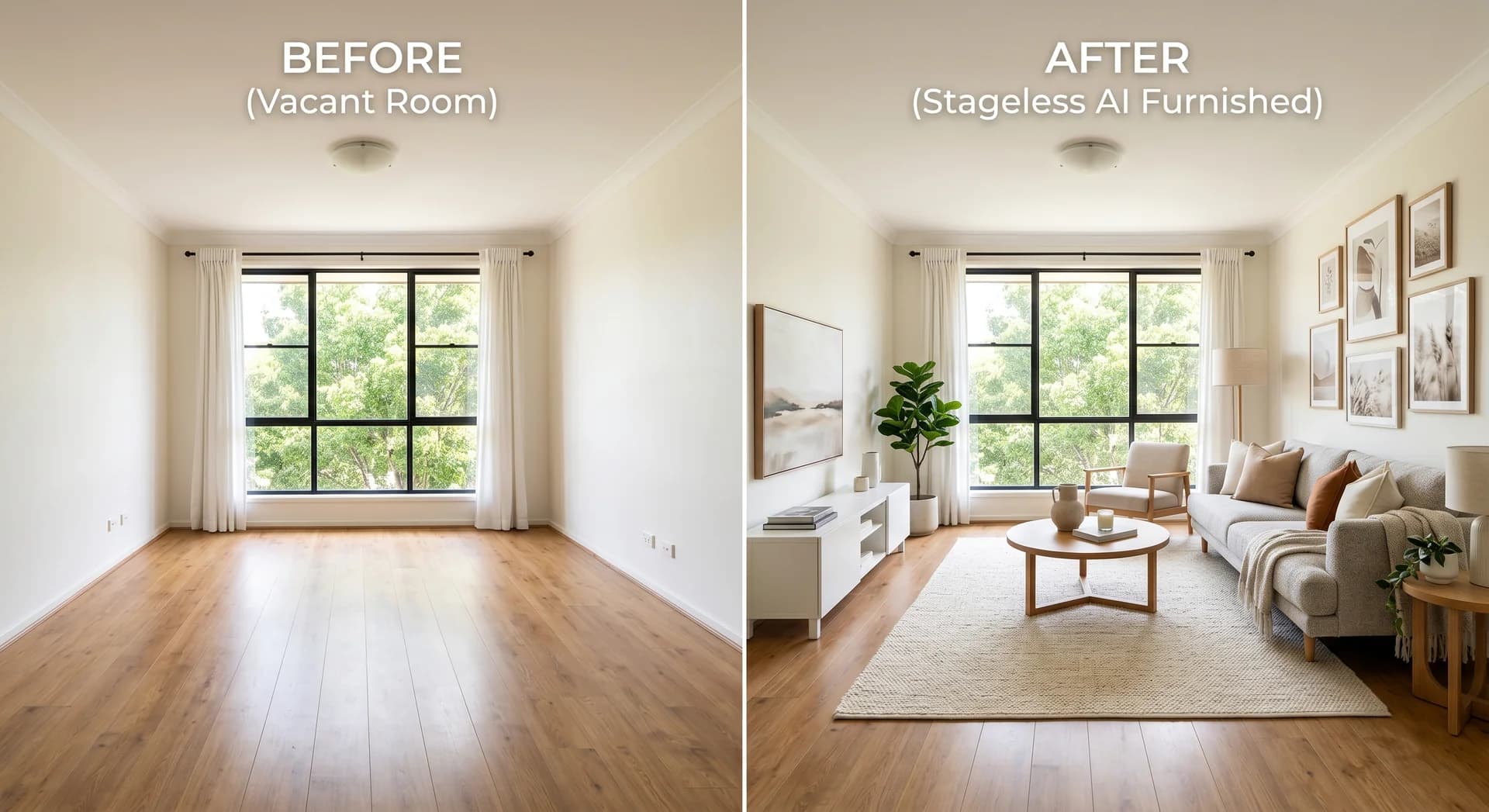
Real Photos or AI-Staged Photos? How to Show a Furnished Home Without Disappointing Buyers

Stageless Team

Most agencies now publish at least a few listing photos decorated with AI. The reason is simple. An empty living room looks small and cold on a phone screen. The same room with a sofa, a rug and a lamp gets the click.
The problem starts at the viewing. The buyer remembers the sofa. The room has bare walls. Part of the goodwill the photo created is lost at the door. Some of it lands on the agency that published the photo.
This guide looks at both sides. It covers what AI-staged photos do well, where the disappointment comes from and what the 2026 rules require. It also describes a third option that keeps the listing honest: real photos in the gallery, with staging the buyer can switch on when they want it.
The Short Answer
Use real photos as the main gallery. If you add AI-staged images, label every one on the image itself and publish the original next to it. Where the portal or your own website allows it, let the buyer stage the room on demand instead of replacing the photo. The buyer still sees a furnished room. The listing never shows something the viewing will contradict.
| Real photos only | Staged photos in the gallery | Real photos with staging on demand | |
|---|---|---|---|
| What the buyer sees first | The room as it is | A furnished room | The room as it is |
| Furnished view | No | Yes, in the style the agency chose | Yes, in the style the buyer picks |
| Risk of disappointment at the viewing | Low | High when the label is missed | Low |
| Disclosure work for the agency | None | Label each image and keep the originals | Label shown inside the viewer |
| Cost | Photography only | From €0.60 per staged photo with AI | Set by the portal or website provider |
Why AI-Staged Photos Became Standard
Staging works because buyers struggle to picture an empty room. In the National Association of Realtors 2025 Profile of Home Staging, 83% of buyers’ agents said staging made it easier for buyers to visualise the property as a future home. The rooms that mattered most were the living room (37%), the main bedroom (34%) and the kitchen (23%).
Physical staging delivers that effect at a high price. Furniture has to be hired, delivered, styled and collected. For most listings the numbers do not work.
AI changed the economics. With Stageless AI, a staged photo costs €0.60 and comes back in less than 30 seconds. An agent can stage the living room, kitchen and main bedroom of every empty listing for less than two euros.
The result is visible on every portal. A 2026 analysis by Coraly of about 40,000 listing photos on Zillow, Redfin, Realtor.com and Homes.com found that nearly 11% showed signs of AI alteration (Fortune, 22 July 2026). No comparable count exists yet for European portals. The tools and the incentives are the same, so there is little reason to expect a different picture.
Where the Disappointment Comes From
A staged photo is a promise about how a room could look. The buyer often reads it as a promise about how the room does look. The trouble starts in that gap. Can buyers tell when a photo was staged with AI? Our article looks at what they notice.
The label gets lost
Most staged photos carry a small note, if they carry one at all. The same Coraly analysis found that more than 90% of the altered images it identified had no visible disclosure (Straight Arrow News, checked October 2026).
Even a correct label is easy to miss. On a phone, a line in the listing description sits below the photos. A watermark in a corner disappears when the image is cropped for a social post or shared in a messaging app. The buyer who saw the photo out of context never saw the warning.
The viewing contradicts the photo
The Boston Globe reported in August 2026 on a Boston broker who drove straight past a house she was showing. The listing had been fully staged with AI and she did not recognise the property from the street. She said the staging got them to the door but the visit started with disappointment.
Disappointment at the door is expensive. The buyer starts the viewing by looking for what else differs from the photos. Small defects that would have gone unnoticed become reasons to doubt the asking price. The agent spends the visit managing expectations instead of selling the home.
The cost lands on the agency and the portal
The buyer does not separate the photo from the people who published it. The agency loses credibility with that buyer and with anyone the buyer talks to. The portal is linked to a listing that did not match reality.
Regulators have noticed. In July 2026, New York City proposed rules on AI-altered rental photos that named listing platforms alongside landlords and brokers (Fortune, 22 July 2026). Zillow responded that it supports clear disclosure when AI materially alters a listing image.
What the Rules Say in 2026
Staging is legal almost everywhere. Hiding it is becoming illegal.
European Union. Article 50 of the AI Act applies from 2 August 2026. It requires disclosure when images have been generated or manipulated with AI. A virtually staged listing photo falls within that scope. Ask your legal adviser how the obligations apply to your agency and to the tools you use.
California. AB 723 has been in force since 1 January 2026. Altered listing photos need a statement that the image has been digitally altered. The buyer must also be able to see the original, through a link, a QR code or the original shown next to the edited version (San Diego MLS).
New York. Assembly bill A11635 would require a disclosure on or next to every digitally altered or AI-generated image in sale and lease listings. Online listings would also have to show the unaltered image or link to it. The bill was introduced on 29 July 2026 and remains in committee at the time of writing (New York State Senate). New York City has proposed separate rules for rental listings.
The direction is the same in every market: show the original and label the change. An agency that already works this way has nothing to adapt when the rules reach its market.
Three Ways to Show a Furnished Home
1. Real photos only
This is the honest default. It works well for furnished homes in good condition, where the real furniture already shows how the rooms can be used.
It works badly for empty properties. Empty rooms look smaller in photos. Buyers struggle to judge scale and often cannot tell whether a double bed fits in the second bedroom. The listing gets fewer clicks than similar homes with furnished photos.
2. Staged photos in the gallery, labelled
This is the most common approach today. Done well, it follows four rules.
- Put the label on the image itself, not only in the description.
- Publish the original photo directly next to each staged version.
- Never change walls, windows, floors, fixtures or the view.
- Use one style for the whole property.
The weakness is structural. The buyer sees the agency’s taste, not their own. The label can still be missed. Every staged photo in the gallery is one more image the viewing has to live up to.
3. Real photos with staging on demand
In this model the gallery shows only real photos. Each room photo carries a button such as Stage with AI. The buyer taps it, picks a style and sees the furnished room in seconds. The generated image is clearly marked and a slider switches back to the original.
Zillow launched this on its premium Showcase listings in September 2025. A Virtual Staging icon appears on selected room photos. Buyers choose from styles such as modern, Scandinavian, industrial, midcentury, luxury, coastal and farmhouse. They can swipe between staged and unstaged views or remove the furniture to see an empty room (Zillow, 10 September 2025).
Zillow made a deliberate choice about the order. The listing opens on the agent’s original images. Staging is an optional tool the shopper decides to use (The Boston Globe, 27 August 2026). The broker interviewed by the Globe said buyers spend more time in each room, which keeps their attention on that property.
How On-Demand Staging Works for the Buyer
- The buyer opens the listing and sees real photos of every room.
- On the living room photo, they tap the staging button.
- They choose a style that matches their own taste.
- A furnished version appears in under 30 seconds, labelled as generated with AI and with a note that furniture is not included.
- They compare it with the original using the slider, try another style or move on.
- They arrive at the viewing knowing exactly what is in the room and what is not.
The difference is who makes the choice. In option 2 the agency decides what the buyer sees. In option 3 the buyer asks to see a simulation and knows it is one. Nothing in the gallery overstates the property, so nothing at the viewing contradicts it.
There is a second benefit. A staged photo shows one style. A young couple and a retired buyer rarely want the same living room. On-demand staging lets each of them see the room their way, which is closer to the original purpose of staging.
For agencies, the model also removes a practical burden. There are no longer two versions of every photo to keep, name and upload in the right order. The gallery holds only originals. The AI label appears automatically where the furnished view is created. That removes the most common mistake in practice: a staged photo that ends up in the listing without a label or is passed on without its original.
When Pre-Staged Photos Still Make Sense
On-demand staging needs an interactive viewer. Some channels do not have one.
- Social media and ads. A single image has to stop the scroll. Use a staged photo, label it on the image and link to the listing with the real photos.
- Off-plan and new developments. The apartment does not exist yet or is still unfinished. Buyers expect visualisations and know they are looking at one.
- Print. Window displays, brochures and magazine ads cannot offer a button. Label the image and print the original next to it where space allows.
- Portals without the feature. If your main portal does not offer on-demand staging, use option 2 with strict labelling until it does.
Your own website is the easiest place to start. You control the listing page, so you can add an on-demand viewer to your own listings today and point portal traffic to it.
A Checklist for Agencies
- Keep every original photo, named by property and room, in the same folder as the staged versions.
- Never use AI to change structural elements, finishes, the view or the condition of the property.
- Label each staged image on the image itself, in the language of the listing.
- Publish the original next to each staged image. The alternative is to show only real photos and offer staging on demand.
- Tell the seller in writing which photos are staged and how they are labelled.
- Brief the agent who runs the viewing. Mention the staging before the buyer walks in.
- Ask your portal whether it offers, or plans to offer, staging on demand for buyers.
Sources
- National Association of Realtors, 2025 Profile of Home Staging (May 2025)
- Fortune, 22 July 2026
- Straight Arrow News, AI listing photos and disclosure (checked October 2026)
- The Boston Globe, 27 August 2026
- Zillow, Virtual Staging on Showcase listings, 10 September 2025
- European Commission AI Act Service Desk, Article 50
- San Diego MLS, AB 723 guide
- New York State Senate, bill A11635
- Stageless AI homepage, checked October 2026
Written by Stageless Team
We are a team of real estate technology experts passionate about AI. Our mission is to help agents sell faster by democratizing access to high-end virtual staging tools.