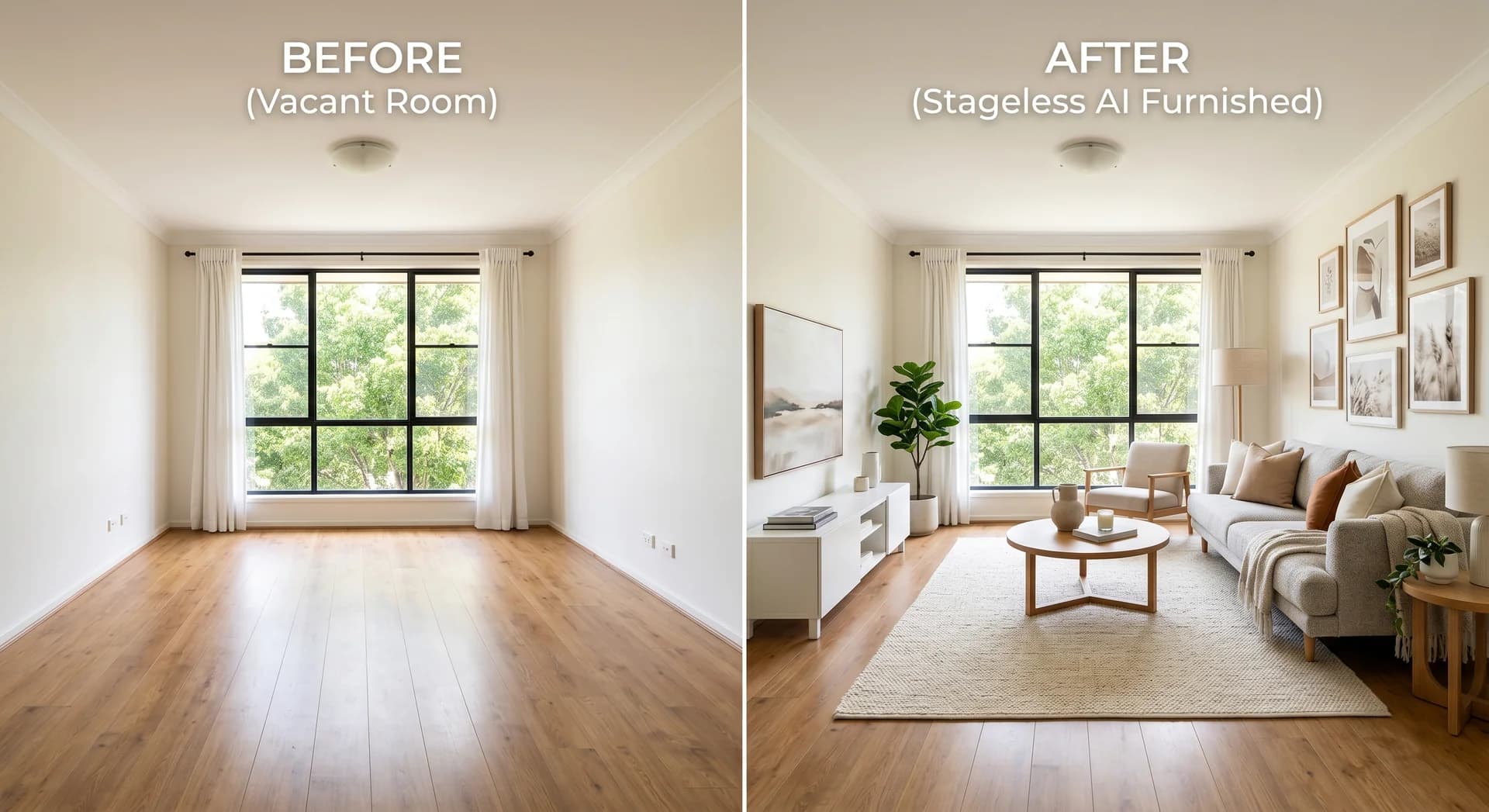
Virtual Staging for Rentals: How to Let an Empty Property Faster

Stageless Team
Most writing about home staging is about sales. Rentals are where agents feel the problem more often. A rental agent re-lists the same unit every time a tenant leaves, usually with days to fill it, usually empty, and with a landlord who will not pay for furniture hire on a property earning nothing.
Virtual staging fits that job well. This guide covers when it helps a rental listing, how to handle furnished and unfurnished lets, what it costs and the disclosure rules that now apply on both sides of the Atlantic.
Why Empty Rentals Are Harder to Let
An empty room photographs badly. Without furniture, a tenant scrolling a portal on a phone cannot judge whether a double bed fits in the second bedroom or where a sofa would go in the living room. Rooms look smaller and colder. All the attention goes to marks on the walls and floor. Our guide to selling an empty property fast looks at the wider problem.
Rental tenants also decide faster than buyers. They compare dozens of listings in an evening and book viewings for the ones that look ready to live in. Every week a unit stays empty is a week of rent the landlord does not recover.
Where Virtual Staging Helps Most
Between tenancies
The previous tenant moves out, the unit is cleaned and painted, and it goes back on the market empty. This is the most common case. Photograph the empty rooms once, stage them, and publish the same day.
Unfurnished lets
The property will be let unfurnished, so physical staging makes no sense at all. Virtual staging shows the scale of each room and one possible way to live in it. The listing must state clearly that the property is let unfurnished.
Student and shared housing
Show how a bedroom works with a desk, bed and storage. For shared flats, staging the common areas helps tenants picture who they would live with.
Build-to-rent and new developments
A new block with forty identical units does not need forty photo shoots. Photograph each unit type and stage it in a consistent style across the building.
Furnished vs Unfurnished: The Rule That Protects You
Virtual staging for a rental carries one risk that sales listings do not. Tenants may assume that what they see is what they get. A furnished let is advertised partly on its contents. If the furniture in the photos is not the furniture in the flat, the listing misleads.
Follow three rules:
- Unfurnished lets: stage freely, label every staged image, and write "let unfurnished" in the description.
- Furnished lets: photograph the real furniture. Use AI only to improve light, remove clutter or tidy the scene. Do not replace furniture with pieces the tenant will not find.
- Part-furnished lets: list what stays. Stage only rooms that will be let empty.
What It Costs Per Unit
Physical staging is rarely an option for rentals. A full staging project costs 1% to 3% of a sale price in most European markets, and nobody runs that budget on a monthly rent. Our guide to home staging cost breaks these figures down by country.
Virtual staging is priced per photo. With Stageless AI, each staged image costs €0.60 on pay-as-you-go and is ready in under 30 seconds. A typical two-bedroom rental listing needs five or six staged photos: living room, kitchen, both bedrooms and possibly a balcony. That is about €3 to €4 per re-let.
For a letting agency managing a hundred units with an average tenancy of two years, that means staging around fifty re-lets a year. At six photos each, the total stays under €200 a year. The Pro plan, at €44.99 a month for 100 credits, covers the volume of a busy letting desk.
What a Vacant Week Costs the Landlord
Landlords who hesitate over any extra cost usually respond to one number: the rent they lose while the unit is empty.
Take a flat let at €1,200 a month. One week of vacancy costs the landlord about €277 in lost rent. Two weeks cost about €554. Staging six photos with an AI tool costs about €3.60.
The comparison does not promise that staging will fill the unit a week faster. No honest agent can promise that. It shows how small the bet is. If staged photos bring even one extra viewing in the first days, the cost has been covered many times over.
Use the landlord's own figures when you have them. Monthly rent, condominium fees and utilities paid while the unit is empty make the case better than any general statistic.
Which Rooms to Stage First
Tenants scroll quickly. They decide on three or four photos, so those are the ones worth staging.
Living room
The first photo in most rental listings and the one that decides the click. Stage it to show where the sofa goes, how a dining table fits and how much space is left to move around.
Main bedroom
Tenants want to know if a double bed fits with space for wardrobes and bedside tables. A staged bedroom answers that question in one image. Keep the furniture to a realistic size for the room.
Second bedroom or home office
In many lets, the second bedroom is the deciding room. Show it as a bedroom for families and sharers, or as a home office for couples who work remotely. Pick one use per listing and say in the description that the room can be used either way.
Kitchen
Kitchens are rarely empty. They usually need tidying rather than staging. Remove clutter, add a few objects on the counter and leave the units as they are. Our guide explains how to declutter with AI before staging the rest of the unit.
Balcony or terrace
Outdoor space is a strong argument in cities. A small table and two chairs show that the balcony is usable, not just a ledge for drying laundry.
Style Choices for Different Tenants
The style should match the people most likely to rent the unit, not the agent's taste.
- Students: simple, durable furniture, a desk in every bedroom and storage. Avoid anything that looks fragile or expensive.
- Young professionals: clean modern furniture, a home office corner and good lighting.
- Families: a dining table big enough for four, a child's bedroom in the second room and storage in the hallway.
- Expats and corporate lets: a neutral, hotel-like look that works for any nationality and any taste.
Whatever the profile, keep the style consistent across every photo of the unit. A tenant comparing listings notices quickly when two rooms look as if they belong to different homes.
Writing the Listing Around Staged Photos
Staged photos and the listing text have to tell the same story. Three lines in the description do most of the work.
- State the furnishing clearly: "let unfurnished", "let furnished" or "part-furnished, list available".
- Say which photos are staged: "Photos 1 to 4 are virtually staged to show possible layouts. Unedited photos follow."
- Give the room sizes in square metres. Staging shows how a room can be used. The measurements confirm it.
Avoid wording that suggests the staged furniture is included, such as "fully equipped" or "ready to move in", unless it is true.
How to Do It, Step by Step
- Photograph the empty unit after cleaning. Shoot from the corners at chest height, with all lights on and blinds open.
- Upload the photos and choose one style for the whole unit. Keep it simple and neutral for rentals.
- Stage the rooms tenants care most about: living room, main bedroom, kitchen.
- Label each staged image as "virtually staged" on the photo.
- Publish the original empty photos next to the staged ones, and state in the description whether the unit is furnished or unfurnished.
Mistakes That Cost Viewings
- Staging a furnished let with different furniture. Tenants arrive expecting the sofa in the photo and leave disappointed.
- Distorting scale. Undersized furniture makes a small room look bigger in the photo and smaller at the viewing.
- Forgetting the originals. Tenants who cannot see the real room may distrust the whole listing.
- Using a different style in each room. The unit looks like a collage instead of a home.
- Staging over defects. Damp, broken blinds or missing fixtures must stay visible in the photos.
Staging at Scale for Property Managers
Letting agencies and property managers stage the same units again and again. A few habits keep that work fast.
- Stage once, reuse at the next re-let. If the unit has not changed, the staged photos from the last tenancy can be published again. Check the photos against the unit before reusing them.
- Name files by building, unit and room, so the right set goes to the right listing.
- Use one style per building. In build-to-rent blocks, a consistent look across all units makes the building feel like a brand.
- Keep the originals with the staged versions in the same folder, ready for disclosure.
Holiday and Short-Term Lets
Short-term rentals follow stricter rules than long lets, because guests book on the photos alone and arrive without a viewing.
For a furnished holiday let, the photos must show the real furniture, the real view and the real size of each room. Use AI to correct light, straighten verticals and remove personal items or clutter left by the last guest. Do not add furniture, appliances or decor the guest will not find.
Virtual staging is still useful before a unit is furnished. An owner preparing a new holiday apartment in the Algarve can stage the empty rooms to test layouts and styles, or to open bookings while the furniture is on order. Replace the staged images with real photos as soon as the unit is ready.
How to Measure the Result
Virtual staging is cheap enough to test properly. Pick a few comparable units and track three numbers for each one.
- Contact requests in the first seven days on the portal.
- Viewings booked before the unit is let.
- Days between listing and signed contract.
Compare units listed with staged photos against similar units listed with empty photos. After a few months, the agency has its own evidence, which convinces landlords more than any general study.
Disclosure Rules for Rental Listings
Regulators are paying closer attention to edited rental photos. Three developments matter for agents in 2026.
European Union
Article 50 of the EU AI Act applies from 2 August 2026. It requires disclosure when images have been generated or manipulated with AI. A virtually staged rental photo falls within that scope. Label every staged image visibly and keep the original. Our guide to AI Act Article 50 covers the details for staged photos.
New York City
On 16 July 2026, Mayor Zohran Mamdani proposed rules requiring landlords, brokers and listing platforms to disclose when rental listing photos or videos were created or altered with AI or other digital tools (Fortune, 22 July 2026). The city's Department of Consumer and Worker Protection would write and enforce the rules (The Next Web, 17 July 2026). At the time of writing, no rule has been adopted.
New York State and California
New York Assembly bill A11635 would require a disclosure on or next to every digitally altered or AI-generated image in sale and lease listings. Online listings would also have to show the unaltered image or link to it. Routine edits such as lighting, cropping and colour correction are excluded. The bill was introduced on 29 July 2026 and referred to the Assembly Housing Committee, where it remains at the time of writing (New York State Senate, bill page). California's AB 723 has been in force since 1 January 2026. It requires the statement “Image has been digitally altered” and access to the original photo, through a link, a QR code or the original shown next to the edited version (San Diego MLS, AB 723 guide).
The direction is the same everywhere: staging is allowed, hiding it is not. An agency that labels staged photos and keeps originals is ahead of the rules rather than behind them.
Sources
Written by Stageless Team
We are a team of real estate technology experts passionate about AI. Our mission is to help agents sell faster by democratizing access to high-end virtual staging tools.