Real Estate Video: Prices, Formats and How to Make One Without a Videographer

Stageless Team
A real estate video shows a property in motion. It can be a filmed walkthrough by a videographer, a drone flight over the house, a 3D tour the buyer moves through, a clip shot on your phone or an AI video tour built from the listing photos. Prices run from nothing to more than €1,500 per property. Delivery runs from a few minutes to a week.
This guide compares the formats with prices we checked on providers' own pages in October 2026. It then shows the cost for 1, 5 and 20 listings a month and how to produce a real estate video for a listing without booking a videographer. We make a dedicated tool, Stageless AI, so read with that in mind.
What Counts as a Real Estate Video
For an agent, a real estate video is any moving image of the property that goes on the portal, on social media or in a message to a buyer. The formats look similar in a feed. They differ in what they need from you on the day of the shoot.
- A videographer walkthrough needs a booking, a visit and an edit.
- A drone video needs a pilot and the right weather.
- A 3D or 360 tour needs a camera that captures the whole space, plus hosting.
- A phone video needs you, a steady hand and some patience in editing.
- An AI video tour needs only the photos you already have.
The right choice depends on the property, the budget and how many listings you publish each month.
The Five Formats and What Each One Costs
Videographer walkthrough
A professional films the property, edits the footage and delivers a short video, usually one to three minutes. This is the format most people mean by "property video".
Prices we found:
- Portugal: Space by Abby in Lisbon lists video only from €120. Its MOTION package, photos plus a horizontal video, costs €180 for a T0 or T1 flat and €210 for a T3.
- Portugal: idealista offers owners a professional video, filmed by a professional and added to the listing, for €299.
- Spain: Sky Films in Barcelona lists a video tour of a flat (up to 2 minutes) at €85 excluding VAT. A cinematic video of a standard flat (up to 2 minutes) costs €195 excluding VAT.
- France: Nodalview's July 2026 survey of the French market puts a simple video without drone at €350 to €570. A standard listing video runs €500 to €2,000.
- Germany: Different Vision lists packages from €560 for a 30-second Reel to €1,590 for a 120-second film, excluding VAT, drone included.
- United Kingdom: Clyde Digital in Glasgow lists a basic property walkthrough video from £260.
The spread is wide for a reason. A €85 video tour is a simple filmed visit. A €1,590 film is a scripted production with drone footage and colour grading. Both are called real estate video.
Drone video
Aerial footage shows the plot, the roof, the garden, the pool and the neighbourhood. It matters for houses, villas and land. It adds little to a third-floor flat in a city street.
WalkTour in Portugal lists drone aerials at €75 with a certified pilot (May 2026). Space by Abby lists drone from €130. In Germany, Different Vision includes drone footage in every package. Weather decides the day, so a rainy week can delay the listing.
3D and 360 tours
A 3D tour lets the buyer move through the property at their own pace. Matterport is one of the most widely used platforms. According to PricingSaaS, which tracks Matterport's pricing page, the Professional plan starts at $90 a month billed annually for 10 active spaces, or $108 billed monthly (12 October 2026). Prices change often, so check matterport.com before you subscribe.
If you do not want to buy a camera, a photographer can capture the tour for you. Sky Films lists a 360° tour of a flat up to 100 m² at €95 excluding VAT, with hosting for 3 months. WalkTour lists 360 tours from €99.
Phone video
You film the property yourself with a phone. It costs nothing but your time. SeLoger's advice for owners, published in April 2020, is still useful: hold the phone horizontally, do not zoom, film each room in one slow continuous movement and keep the video between one and two minutes, or three to four for a large house. The difficulty is not the camera. It is shaky footage, dark rooms and the hour of editing afterwards.
AI video tour from photos
You upload the listing photos in order. The software adds camera movement to each image and joins them into one video. With Stageless AI, you choose a movement per room (pan, zoom, dolly or a simulated aerial view), then generate. The tour is ready within minutes as a high-definition MP4. Its length follows the number of photos. There is no extra production cost per video within the plan allowance: the Base plan (€10.99 a month) includes one video tour a month and the Pro plan (€44.99 a month) includes three.
This format does not replace filmed footage of a real walk through the house. It turns the photos you already have into motion, the same day, with no visit.
Real Estate Video Prices Side by Side
| Format | Example price | Delivery | What you need |
|---|---|---|---|
| Videographer walkthrough | €85 excl. VAT (Barcelona) to €1,590 excl. VAT (Germany) | 1 to 7 days | A booking and a visit |
| Drone video | €75 to €130 (Portugal) | Same as the shoot, weather permitting | A certified pilot, good weather |
| 3D tour (Matterport) | From $90 a month, billed annually, for 10 spaces | Same day to 48 hours | A compatible camera or a photographer |
| 360 tour by a photographer | €95 excl. VAT (Barcelona), from €99 (Portugal) | Around 48 hours | A visit |
| Phone video | Your time | Same day | A phone, a stabiliser helps |
| AI video tour (Stageless AI) | Included in plan: 1 a month (€10.99) or 3 a month (€44.99) | Within minutes | The listing photos |
Delivery times come from the providers: Space by Abby delivers video in up to 3 days, Nodalview reports 48 hours to 5 working days in France, Different Vision delivers within 7 days and Clyde Digital uploads in 24 to 48 hours. Prices exclude travel unless stated.
What a Real Estate Video Costs for 1, 5 and 20 Listings a Month
One video is easy to approve. The question for an agent is what happens when every listing gets one.
| Listings a month | Lisbon, video only from €120 | idealista Portugal, €299 | Germany, from €560 excl. VAT | Stageless AI video tours |
|---|---|---|---|---|
| 1 | €120 | €299 | €560 | €10.99 (Base, 1 tour included) |
| 3 | €360 | €897 | €1,680 | €44.99 (Pro, 3 tours included) |
| 5 | €600 | €1,495 | €2,800 | Pro, 3 of the 5 tours included |
| 20 | €2,400 | €5,980 | €11,200 | Pro, 3 of the 20 tours included |
The videographer columns multiply the entry price. Larger properties cost more. The Stageless AI column is the plan price. The plans also include photo credits: 20 a month on Base and 100 on Pro, so the staging of the photos used in the video is covered too. Tours beyond the plan allowance are not counted in this table.
For an agent with three or four listings a month, the difference is a few hundred euros. For an agency with twenty, it decides whether every listing gets a video or only the most expensive ones.
How to Make a Real Estate Video Without a Videographer
This section covers the decisions for one listing. For the click-by-click tutorial, see our step-by-step guide to creating a video tour.
1. Shoot photos with the video in mind
A video built from photos is only as good as the photos. Take level shots from the corners, with the lights on and the windows correctly exposed. Shoot each main room from at least two angles. Add the façade, the entrance, the view from the balcony and any outdoor space. Twelve to twenty photos give a tour of a sensible length.
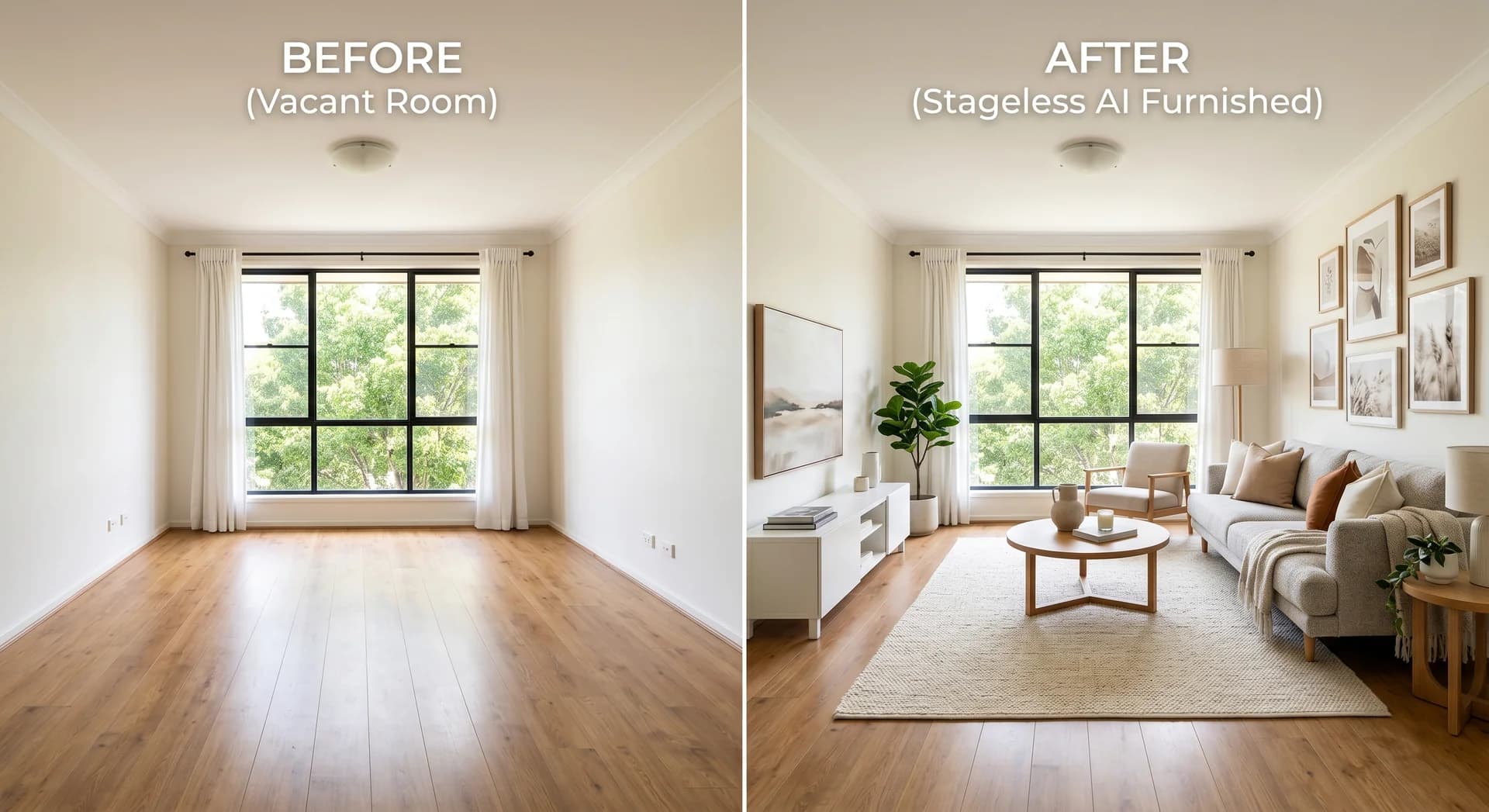
2. Stage first, then make the video
If the property is empty, stage the photos before you generate the video. A tour built from empty rooms followed by a staged gallery shows two different homes. With Stageless AI, each staged image takes under 30 seconds and costs one credit, €0.60 per photo at the listed price. Keep one style for the whole property. Our guide to the staging-first, video-second workflow explains the order in detail. If you are weighing physical furniture instead, compare it with what home staging costs per room. If you are new to it, our guide to virtual staging explains the basics.
3. Put the rooms in the order of a real viewing
Start outside or at the entrance. Then go to the living room, the kitchen, the bedrooms, the bathrooms and finish on the best feature: a terrace, a view, a garden. Buyers follow a video like a visit. A random order makes the flat hard to picture.
4. Choose one movement per room
Match the movement to the room. A slow pan suits a wide living room or kitchen. A zoom draws attention to a fireplace or a freestanding bath. A forward dolly works in corridors and long rooms. Use the simulated aerial view on an exterior photo of a house, not on a flat. Avoid giving every room the same movement. It looks mechanical after the third room.
5. Watch it once on a phone
Most buyers will see the video on a phone. Check that the rooms are recognisable, that the order makes sense and that no photo looks distorted. Remove any image that does not hold up in motion. A shorter tour beats a long one with weak shots.
6. Publish it where buyers look
Upload the MP4 to the portal, add it to your website listing and share it with buyers on WhatsApp. For social media, check the format each network expects. SeLoger recommends horizontal video for listings. Social feeds favour vertical clips, which is why providers such as Space by Abby sell vertical Reels as a separate product.
What the Portals Accept
Portals do accept video, each in its own way. What we could confirm in October 2026:
- ImmoScout24 (Germany): an Exposé can hold up to 150 multimedia files and one playable video. All common formats are accepted. The maximum file size is 1 GB. The video is converted automatically for playback.
- idealista (Spain): according to the help pages of onOffice, a CRM that publishes to idealista, the portal accepts video only as a direct download link through its API. A YouTube link does not work. In Portugal, idealista sells its own professional video service at €299.
- SeLoger (France): in April 2020, SeLoger allowed one video per listing, added by the agent through the MySeLogerPro app, with the sound muted on publication. These are the latest rules SeLoger has published. Check the current limits in your SeLoger Pro account.
- Imovirtual (Portugal): we could not find current public documentation on video in listings. Ask your Imovirtual contact before you plan a video for that portal.
idealista's own guidance on listing videos (March 2025) is worth reading. It recommends keeping at least 70% of the video on the property, making a separate video for each listing and preferring continuous real footage to photo slideshows with effects and transitions. An AI video tour is more than a slideshow, but the advice is clear: if a portal's audience expects filmed footage, a videographer or a phone walkthrough still has a place.
When a Videographer Is Still the Right Choice
AI video tours and phone clips cover most everyday listings. A videographer is still worth the money in these cases:
- Premium homes and villas, where the video is a brand piece and drone footage of the plot matters.
- New developments, where the video also sells the location, the amenities and the developer.
- Properties with a story: a restored farmhouse, a listed building, an architect's house. Narration and real movement through the space carry the story.
- Listings where the seller expects it and has agreed to pay for it as part of the marketing plan.
- Properties whose value is in the flow between spaces, such as open-plan lofts, which a real walkthrough shows better than a sequence of photos.
For the rest of the portfolio, a videographer at €120 to €560 or more per listing is hard to justify every month. Our comparison of video tours and traditional video looks at the trade-off in more detail. Our guide to home staging cost puts these figures next to the price of physical staging.
Common Real Estate Video Mistakes
- Making the video too long. One to two minutes for a flat is enough. Buyers drop off long before minute four.
- Showing the agency more than the home. A logo at the end is fine. Thirty seconds of branding at the start is not.
- Reusing one video for several listings. Each property needs its own.
- Filming with the lights off or the blinds down. Dark rooms look smaller and colder.
- Mixing empty rooms and staged rooms in one tour. Stage everything first, or nothing.
- Using a drone shot for a flat where the only view from above is the roof of the building.
- Forgetting the sound. SeLoger muted audio in 2020. Many people watch social video without sound. Do not rely on narration alone to explain the property.
Disclose AI-Staged Rooms in the Video
If the video shows rooms furnished with AI, say so. Under Article 50 of the EU AI Act, images generated or manipulated by AI must be disclosed. The same applies when those images move. Our summary of the AI Act disclosure rules covers the details.
In practice, add a short caption such as "virtually staged" on the staged rooms or at the start of the video. Repeat it in the listing text. Keep the original photos in the gallery so buyers can see the empty rooms too. Never use staging in a video to hide damp, cracks, missing fixtures or a view that does not exist. The furniture is a suggestion. The room has to be real.
A Real Estate Video Checklist for Each Listing
- Decide the format based on the property: AI tour, phone video, videographer or drone.
- Collect 12 to 20 level photos, including exteriors.
- Stage empty rooms in one style before generating the video.
- Order the photos like a real viewing.
- Pick one camera movement per room and vary them.
- Check the video on a phone before publishing.
- Label staged rooms in the video and in the listing.
- Upload to the portal in the format it accepts, then share on WhatsApp and social media.
Sources
- Space by Abby, price list (checked October 2026)
- idealista Portugal, professional real estate videos (checked October 2026)
- Sky Films BCN, price list, September 2026
- Nodalview, vidéaste immobilier, updated 14 August 2026
- Different Vision, Immobilienvideo, updated 7 August 2026
- Clyde Digital, property video prices (checked October 2026)
- WalkTour, fotografia imobiliária preço Portugal, 18 May 2026
- PricingSaaS, Matterport pricing, 12 October 2026
- PricingSaaS, Matterport pricing changes, week 42 2026
- ImmoScout24, Bilder, Grundrisse und Videos (checked October 2026)
- onOffice, special features idealista (checked October 2026)
- idealista, listing videos advice, 4 March 2025
- SeLoger, smartphone video of your home, 14 April 2020
- Stageless AI, AI video tours (checked October 2026)
- Stageless AI, plans (checked October 2026)
Written by Stageless Team
We are a team of real estate technology experts passionate about AI. Our mission is to help agents sell faster by democratizing access to high-end virtual staging tools.